Redirection from yuu App to partner via CTA
Purpose
The yuu app will based on partner-provided HTTPS URL or deeplink to trigger CTA to the Partner website or app. Those provided links need to be mobile friendly in terms of their layout.
Workflow Overview
-
yuu app opens Partner web page inside a WebView.
-
The Webview call is an HTTPS GET call and includes below parameters in the URL string:
{{ctaLink}}/?idtoken={{idtoken}}&offerId={{offerId}}&lang={{language}}&addresstype={{addressType}}Parameter Description {{ctaLink}}The HTTPS web URL provided by the partner and used by yuu as part of the offer setup. {{idtoken}}A JWT token with 5 mins expiry. {{offerId}}A unique offer identifier set up by yuu Rewards when they create a new offer. {{language}}A two-letter code indicating the member's preferred language: zh-Hant= Traditional Chinese,zh-Hans= Simplified Chinese,en= English.{{addressType}}An identifier for the user's currently selected address. The identifier is a datetime stamp in text format, e.g. "2021-04-12T23:59:59". This value is used to map the Current Address and is mentioned in the Type field under the Addresses array object of the/getPartnerDetailsAPI. -
Partner validates JWT locally.
-
Partner fetches member profile and redeemed rewards from Loyalty platform.
Architecture & Journey
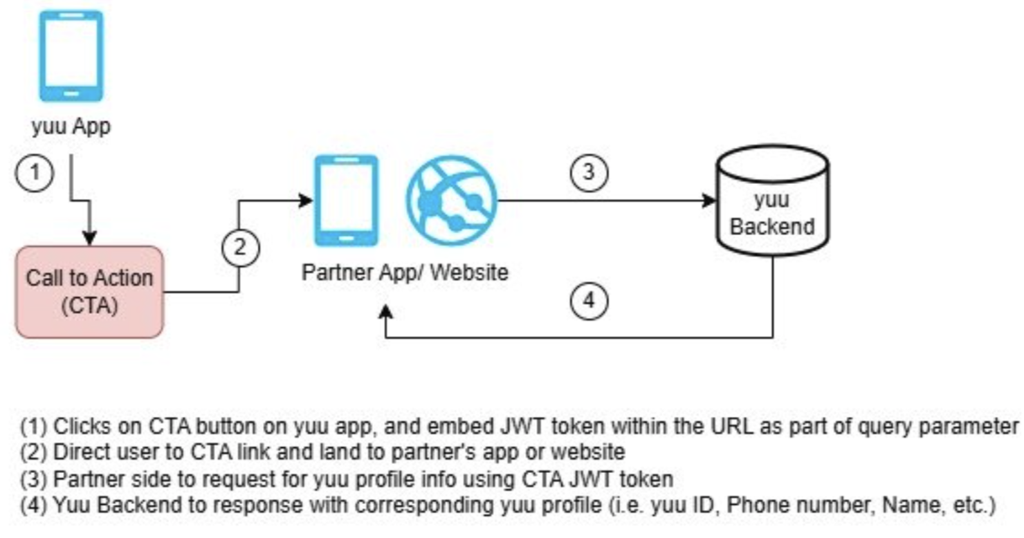
APIs Involved
GET /member/getPartnerDetails— Get member profile & redeemed rewards (CTA flow)
Key Notes
- JWT passed via URL is time-limited.
- Partner must not open new browser windows inside WebView.
- Partner should treat this flow as read-only until explicit consent or linking is completed.