yuu SSO Authentication & Identity Establishment
Purpose
yuu SSO Authentication is a web-view method provided to partner side to trigger. This is to provide a security yuu member validation before exchanging for yuu credentials to partner end, only after a yuu member complete by inputting phone number and OTP. Then the yuu access token, yuu member Profile along with yuu ID would be exchange to partner side.
Workflow Overview
- Partner redirects the user to the yuu SSO authorization endpoint.
- The user authenticates on the yuu login page.
- An authorization code is returned to the Partner callback URL.
- Partner exchanges the authorization code for JWT and refresh tokens.
- JWT is used for subsequent authenticated API calls.
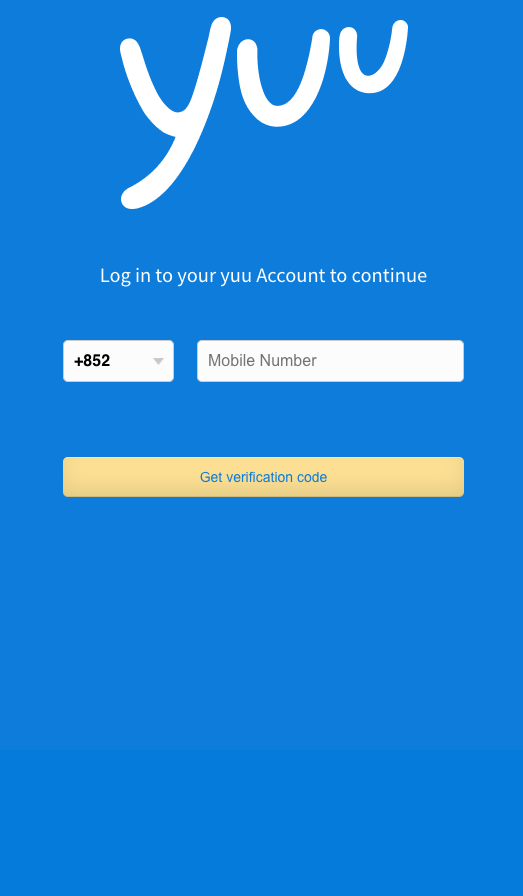
Architecture & Journey
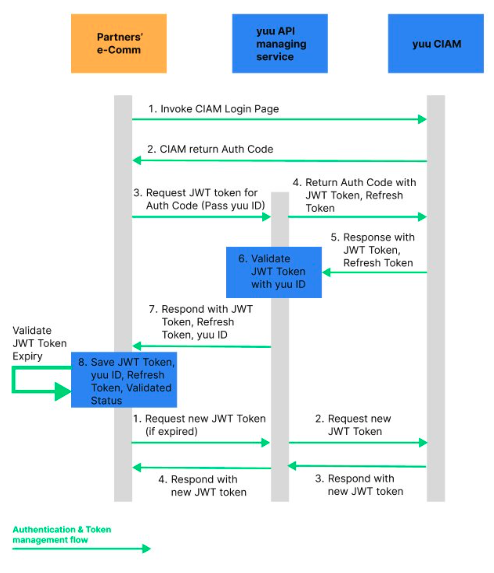
APIs Involved
- Authorization Endpoint (OIDC Authorization Code Flow). Refer to the section as mentioned below.
POST /auth/code- Exchange authorization code for JWT and refresh token. Refer to Auth Code Exchange.POST /auth/token/idtoken- Refresh JWT when expired. Refer to Token Refresh.
Authorization Code Flow
The authorization code flow returns an authorization code that can then be exchanged for an identity token (JWT Token). It requires client authentication using a client_id to retrieve tokens from the back end and has the benefit of not exposing tokens to the user agent (i.e. a web browser). This flow allows for long-lived access (through the use of refresh tokens). Clients using this flow must be able to maintain a secret.
This flow obtains the authorization code from the authorization endpoint and all tokens are returned from the token endpoint.
Opening the Login Dialog / Authorization Endpoint
Redirect your user to the following URL to get the login prompt:
SIT/UAT:
https://cloud-api.loginradius.com/sso/oidc/v2/{oidcappname}/authorize?client_id={LoginRadius API key}&redirect_uri={Callback URL}&response_type={one of the response_types available}&state={random long string}&scope=openid&nonce={Unique Generated nonce}
PROD:
https://sso.yuu.hk/sso/oidc/v2/loyaltypos/authorize?response_type=code&redirect_uri={redirectLink}&login=true&scope=openid&client_id={LoginRadius API key}
Available Query Parameters
| Parameter | Description |
|---|---|
client_id | CIAM API key (each Banner will have its own) |
redirect_uri | Callback URL of Partner page for customer to continue the application (will vary by Banner) |
response_type | code — to specify that you are doing the Authorization Code flow |
state | Random string that is returned with the access_token in the redirect callback. This parameter will be returned as-is, as part of the response. |
scope | Should be set to openid |
nonce | A unique generated nonce |
Key Notes
- JWT tokens are short-lived and must be refreshed using a valid refresh token.
- Refresh tokens are single-use; a new refresh token must replace the old one on each refresh.
- JWT contains the authenticated loyalty identifier and must be validated on Partner side before use.
Handling User Cancellation During SSO
Purpose
Gracefully handle scenarios where the user cancels login during SSO.
Workflow Overview
- User clicks Cancel on the SSO page.
- The SSO window triggers a
window.close()event and redirects toabout:blank. - Partner application detects this state.
- Partner closes the SSO view and navigates the user to an appropriate fallback screen.
APIs Involved
No backend API (frontend handling only).